GitHub Hands-on Part 3: Branch Management Techniques
This article is a translated version of my original post on Qiita. Original (Japanese): https://qiita.com/segur/items/1dd578003da46bddc117
GitHub Hands-on Part 3: Branch Management Techniques
This article is the material for the third part of the GitHub Hands-on series! It assumes you have read the past articles, so please keep that in mind.
GitHub Hands-on Series
- GitHub Hands-on Part 1: Individual Development
- GitHub Hands-on Part 2: Collaborative Development
- GitHub Hands-on Part 3: Branch Management Techniques ← This article
- GitHub Hands-on Part 4: Undo Various Changes
- GitHub Hands-on Part 5: Ignore List
- GitHub Hands-on Part 6: Large Files
Preparing the Repository
We will use the GitPractice repository created in Hands-on Part 1 for this session as well! If you have deleted your repository, please recreate it.
Open your Fork, fetch & checkout, and update the main branch to be the latest.
Branch Management Techniques
There are various schools of thought on how to use branches, but here we will introduce the famous GitHub Flow!
GitHub Flow
On GitHub, it's common for thousands of programmers to collaboratively develop on a single repository. To avoid confusion in such situations, the branch management technique known as GitHub Flow was devised. Follow these rules to manage branches effectively.
- Create a topic branch from the main branch.
- Keep the main branch in a state that is always releasable.
- Push topic branches frequently.
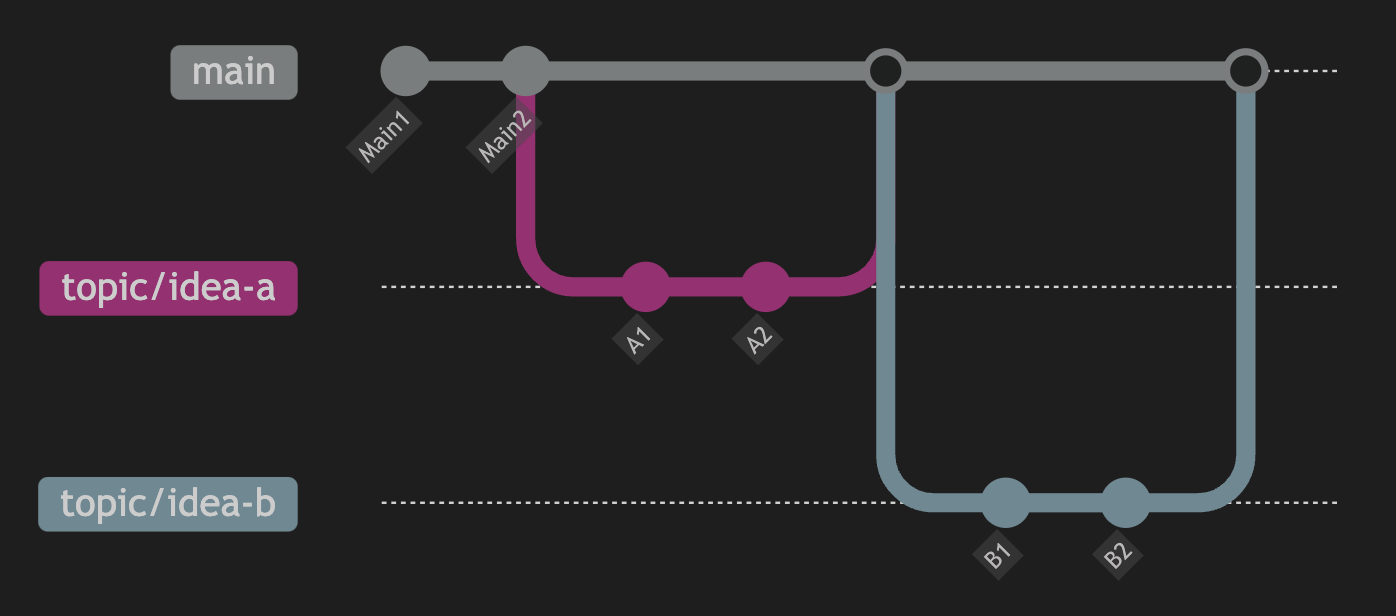
(Note: Code reviews using Pull Requests are also part of GitHub Flow, but as this hands-on does not cover Pull Requests, we will omit this explanation.)
Creating a Topic Branch from the Main Branch
When you start working on something, create a topic branch from the main branch. Avoid working directly on the main branch. The main branch should only advance when topic branches are merged.
Topic Branch Naming Examples
The name of a topic branch should describe its purpose clearly. For instance, if you are adding a button feature, you might name it as follows:
- topic/TaskName
- Example: topic/add-button
- TaskType/TaskName
- Example: feature/add-button
- Task types might include:
- feature: function development
- fix: bug fix
- DeveloperName/TaskName
- Example: segur/add-button
- DeveloperName/IssueNumber/TaskName
- Example: segur/123/add-button
- The issue number refers to numbers issued by task management tools (e.g., GitHub Issue, JIRA).
Differences between / and - will be explained later! While it's common to separate words with -, you can also use _ or capitalize words; Git will work with these conventions.
Keep the Main Branch Always Releasable
To ensure other members can use the main branch confidently, do not merge topic branches with unstable functionality into it. For example, if person A creates a topic branch that has errors, merging it into the main branch could cause problems for person B when they use the main branch. B would need to investigate the errors, wasting valuable time. Avoid merging unstable topic branches into the main branch.
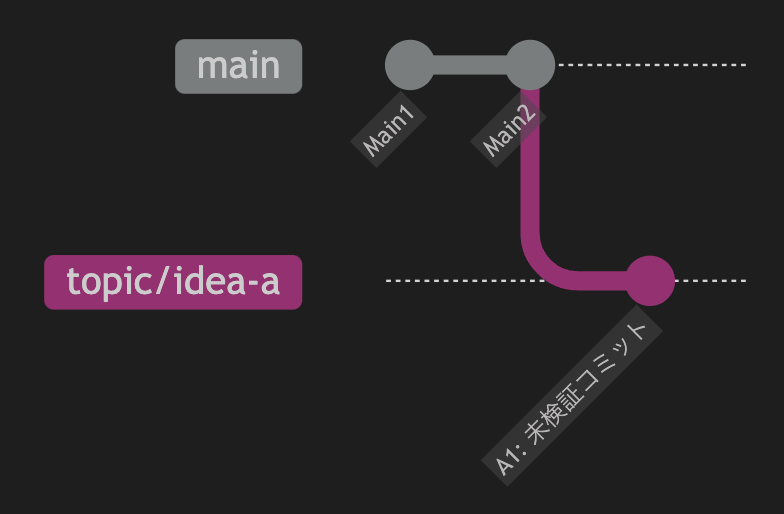
- ✅: Install a Unity Asset, commit to the topic branch without testing it.
- ❌: Install a Unity Asset, commit to the topic branch without testing it, and then merge it into the main branch.
- ✅: Install a Unity Asset, commit to the topic branch, find an error during testing, fix it, and then merge into the main branch.
Push the Topic Branch Regularly
In team development, sharing work progress is crucial. If person A pushes their topic branch once a week, person B can review it weekly. If person A pushes daily, person B can review daily. Frequent information sharing helps avoid branch conflicts and duplicate work. Aim to push daily!
Branch Terminology
GitHub Flow ≠ Git Flow
When researching branch management techniques, you may encounter the term Git Flow, which is different from GitHub Flow. Be cautious as the names are similar. Git Flow is an idea that adds a develop branch to GitHub Flow.
Topic Branch = Feature Branch
You may also come across the term feature branch, which is another name for a topic branch.
- In GitHub Flow, it's called a topic branch.
- In Git Flow, it's called a feature branch.
In Japanese, some might refer to it as a feature branch, tributary, or branch.
Main Branch = Master Branch
You may also encounter the term master branch, which was the former name for the main branch. Due to the term "master" being sensitive as it references "slave master," it has become less commonly used.
https://www.publickey1.jp/blog/20/githubmainmastermain.html
In Japanese, some might refer to it as an integration branch, mainline, or trunk.
Organizing Branches
Adding Slashes to Branch Names
Create a branch named YourName/update-read-me, change the content of README, and commit.

When you view Branches on the left side of Fork, you'll see a folder with your name. This is because a / in the branch name makes Fork display it as a folder!
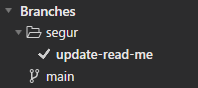
When there are many branches, organizing them into folders improves visibility, so use this feature proactively! Note that - does not create folders, so make sure to use them accordingly!
Conclusion
We'll stop here for today! Well done!
Next time, we'll cover undoing various changes! We hope you'll continue to practice with us!
https://qiita.com/segur/items/8ce6914af5578c5f4ce2
I referred to the following article while creating this article. Thank you for the clear explanation!