My Study Notes on Convolutional Neural Networks (CNN)
This article is a translated version of my original post on Qiita. Original (Japanese): https://qiita.com/segur/items/4cc70b4d572bf132a35f
Introduction
I studied CNN (Convolutional Neural Network) in deep learning, and I'm writing down what I understood as a beginner.
References
These resources were very helpful, especially the animated diagrams:
- How Do Convolutional Neural Networks Work?
- Machine Learning for High Schoolers (7): CNN Part 1
- Understanding Convolutional Neural Networks from Scratch
- Stanford wiki / Convolution schematic.gif
- Deep Learning Chapter 6: Convolutional Neural Networks

The Goal: Recognizing Objects in Images
There has long been a need to identify and recognize objects in pixel images, for example:
- Recognizing text in a scanned photo of a paper document
- Recognizing musical notes in a photo of sheet music
- Detecting obstacles in dashcam footage
CNNs are designed to meet these needs.
How Does Object Recognition Work?
CNNs use the following processing steps to emphasize features:
- Convolution: Apply a filter to highlight features
- Pooling: Resize to reduce noise
By amplifying distinguishing features, the network can more easily recognize objects.
What Is Convolution?
CNN stands for Convolutional Neural Network. The word "convolutional" refers to the process of applying a filter to emphasize features.
This animation explains it clearly:
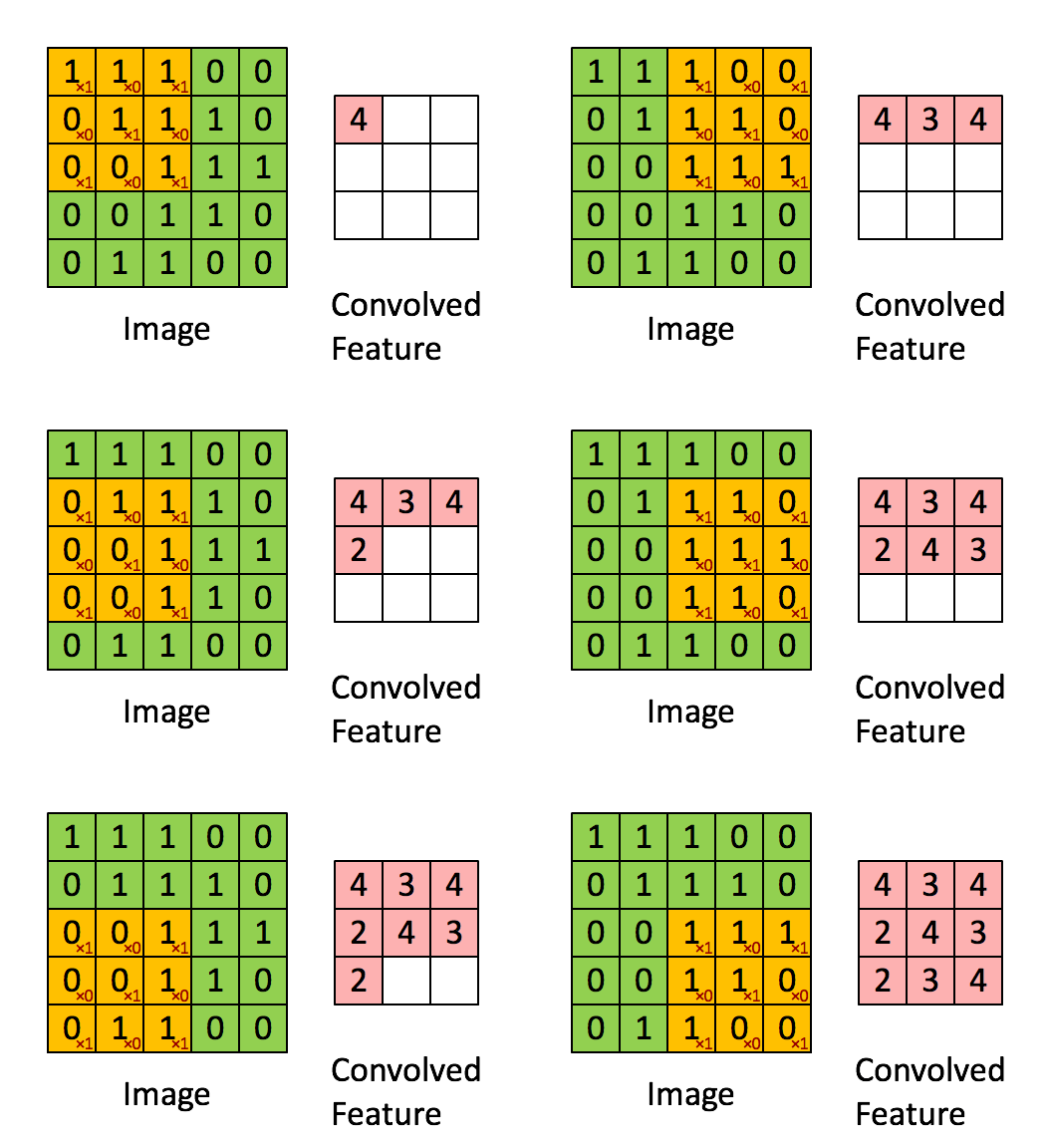
Source: Stanford wiki / Convolution schematic.gif
Before convolution, we have a 5×5 grayscale image:
\begin{align}
  \text{Before convolution} = \left(
    \begin{array}{ccccc}
      1 & 1 & 1 & 0 & 0 \\
      0 & 1 & 1 & 1 & 0 \\
      0 & 0 & 1 & 1 & 1 \\
      0 & 0 & 1 & 1 & 0 \\
      0 & 1 & 1 & 0 & 0 \\
    \end{array}
  \right)
\end{align}
The filter is 3×3:
\begin{align}
  \text{Filter} = \left(
    \begin{array}{ccc}
      1 & 0 & 1 \\
      0 & 1 & 0 \\
      1 & 0 & 1
    \end{array}
  \right)
\end{align}
After applying the filter, a 3×3 output is produced:
\begin{align}
  \text{After convolution} = \left(
    \begin{array}{ccc}
      4 & 3 & 4 \\
      2 & 4 & 3 \\
      2 & 3 & 4
    \end{array}
  \right)
\end{align}
Higher values (like 4) indicate stronger features; lower values (like 2) indicate weaker features. This is how convolution highlights what matters.
One downside: the output shrinks from 5×5 to 3×3, losing data around the edges.
Padding
To prevent the loss of edge pixels during convolution, we add a border of pixels around the original image — this is called padding.
Filling that border with zeros is called zero padding. However, in image data, 0 often represents black, which can interfere with filters sensitive to brightness.
To work around this, there are various techniques that fill the border with more representative values rather than zeros.
Stride
Stride literally means "step size."
So far, we've been sliding the filter one pixel at a time — that's a stride of 1. If we move the filter two pixels at a time, that's a stride of 2.
Pooling
Pooling comes from the idea of "retaining" or "collecting."
Larger input images contain more noise. Pooling downsamples the image while preserving important features, reducing the resolution.
Common pooling methods include:
- Take the maximum value from neighboring pixels (max pooling)
- Take the average value from neighboring pixels (average pooling)
Closing
I'm sure there are mistakes here — please feel free to point them out!