Challenges Faced by a 10-Year Unity Veteran Learning Unreal Engine
This article is a translated version of my original post on Qiita. Original (Japanese): https://qiita.com/segur/items/5f9fed29462b098929d1
Recently, I had the opportunity to create a game using Unreal Engine for the first time, thanks to an invitation from my friend SensitiveCube. Here is the game we submitted to "UE5 Petit Con."
https://x.com/segur_vita/status/1909564629698691502
I have been using Unity for nearly a decade in my work. Here, I'd like to share the "challenges" I faced when I started using Unreal Engine.
Motion Blur and Ray Tracing Are Enabled by Default
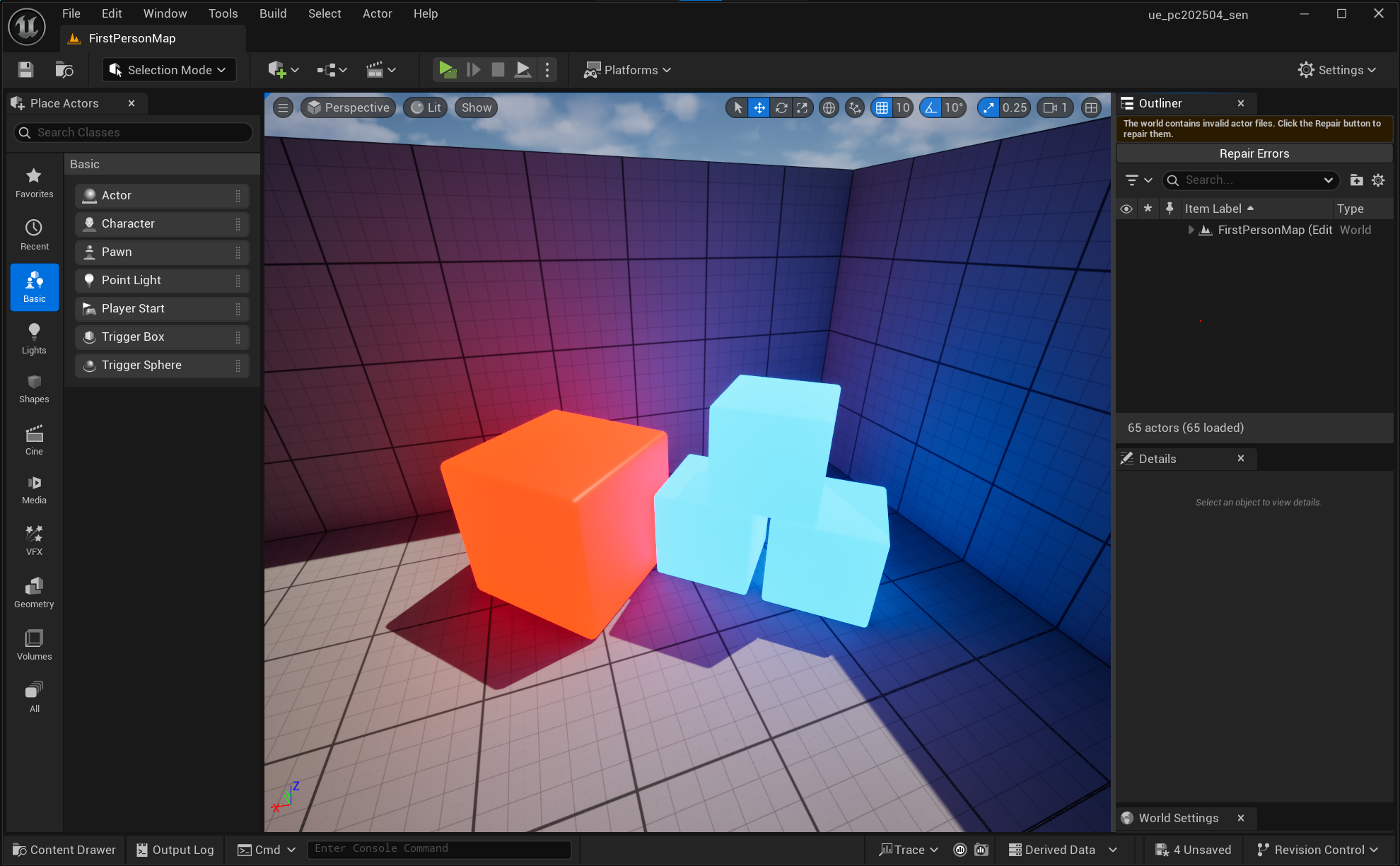
One of the most shocking discoveries was that when I opened the default FirstPerson sample, ray tracing was enabled by default!
For example, simply setting an EmissiveColor on a Cube results in its color being reflected on the floor and walls.
 |
|---|
| A scene with only EmissiveColor set on a Cube's Material The color is automatically reflected on the floor and walls |
Seeing this gave me a cultural shock.
I felt that this might demotivate beginners from learning about lighting.
Confusion with the Term "Level"
In Japan, when we hear "level," many people associate it with a numerical value indicating a character's growth (e.g., leveling up with experience points).
However, in Unreal Engine (UE), a "Level" corresponds to what Unity users know as a Scene.
Of course, in the Unity community, the term "Level" is sometimes used to mean terrain or maps. I've touched on this in past articles.
https://qiita.com/segur/items/db3fecf170e67d7c739c#ゲーム業界の英語が少し難しかった
Still, I was puzzled when I was explicitly presented with "Level" as an official term.
Comparing Blueprint to JSON and GameObject to XML
In UE, Blueprints are akin to Unity's Prefabs.
While Blueprints can include multiple components (such as Static Mesh, Collision, etc.), the role of these components differs somewhat from Unity's components.
This is because Blueprints can include other Blueprints as components. This initially caught me off guard.
This structural difference felt similar to the difference between XML and JSON.
Unity's GameObject Resembles XML
Here is an XML sample:
<Event name="Study Session" date="2025-XX-XX" place="Conference Room">
  <Session time="10:00" title="Opening Session"/>
  <Session time="11:00" title="Latest Technology Introduction"/>
  <Session time="13:00" title="Hands-on Workshop"/>
</Event>
In XML, elements can contain other elements. This is similar to GameObjects containing other GameObjects.
Additionally, XML elements can have attributes, like the name and time in the sample above. This is akin to GameObjects having components.
UE's Blueprint Resembles JSON
On the other hand, JSON expresses all information in a nested structure as elements.
Here is a JSON sample:
{
  "event": {
    "name": "Study Session",
    "date": "2025-XX-XX",
    "place": "Conference Room",
    "schedule": [
      {
        "time": "10:00",
        "title": "Opening Session"
      },
      {
        "time": "11:00",
        "title": "Latest Technology Introduction"
      },
      {
        "time": "13:00",
        "title": "Development Hands-on"
      }
    ]
  }
}
There is no concept of attributes as in XML; everything is arranged in parallel. I felt UE's Blueprint closely matches this structure.
Blueprint Functions Offer Encapsulation
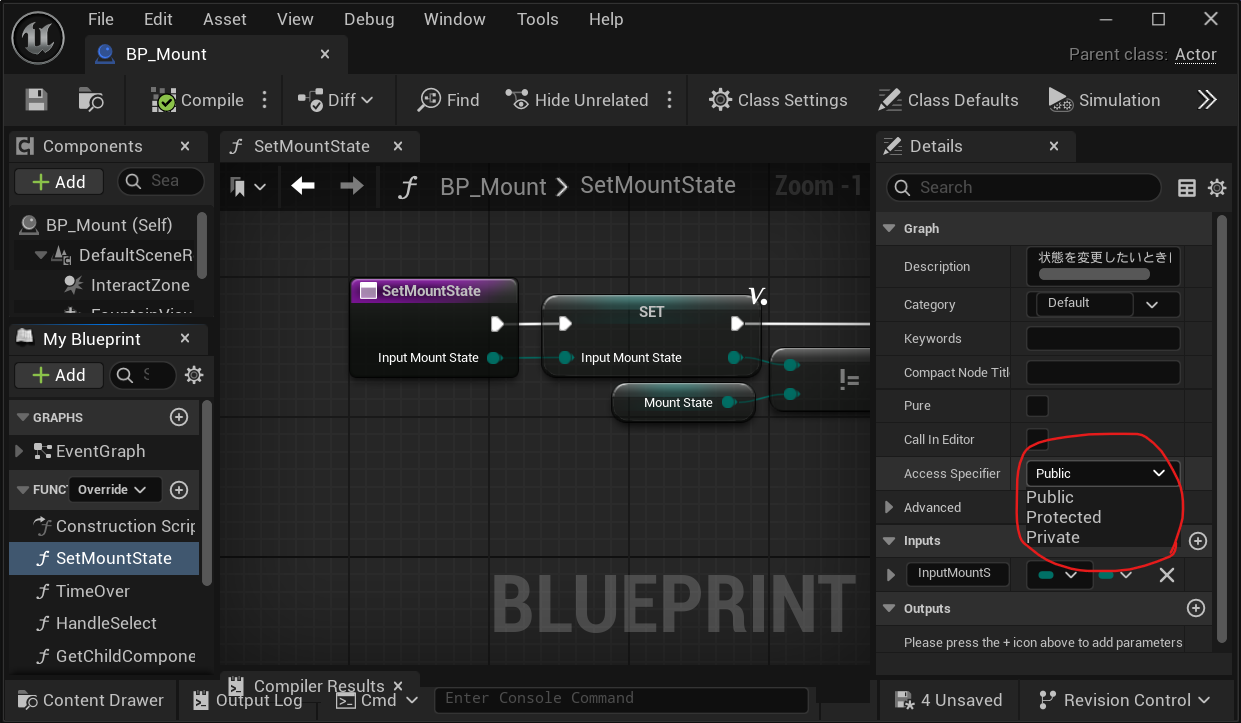
Blueprint functions, compared to Unity Visual Scripting (formerly Bolt) subgraphs, can act as more traditional functions.
Specifically, they allow access control features like public and private.
 |
|---|
| Access control diagram |
This means Blueprints can be designed with a sense closer to C# classes.
This is a thrilling form of confusion!
Polymorphism with Blueprints!
There's even more to be amazed about. Blueprints can actually use Interfaces!
Unity's Visual Scripting (formerly Bolt) lacks interfaces, making it difficult to create test stubs or designs with separated dependencies.
However, in Unreal Engine, Blueprints enable polymorphism with interfaces!
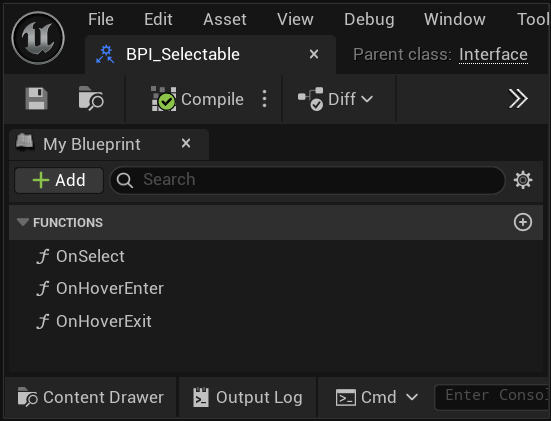
For example, I created interfaces that handle "mouse click" and "mouse hover" operations. Interfaces only declare functions.
 |
|---|
| Example of an Interface for mouse operations |
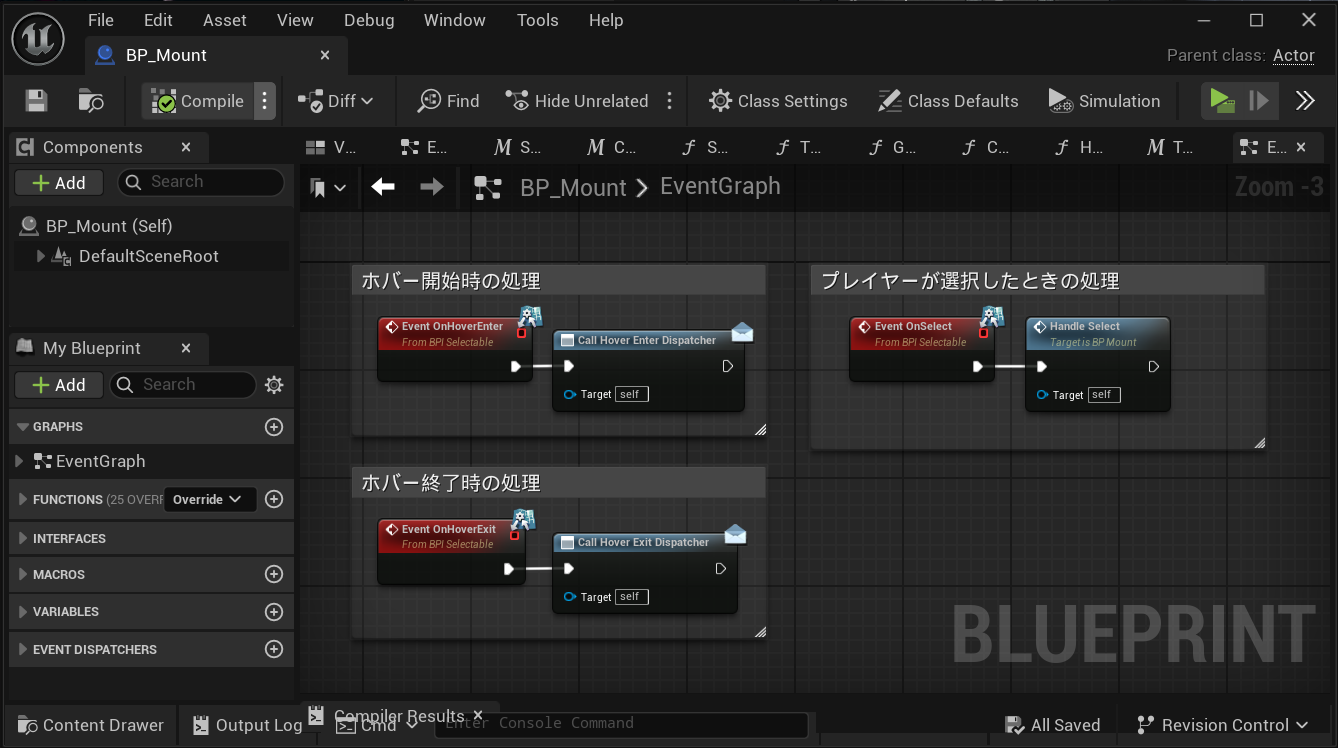
I create Blueprints inheriting from this interface, defining the specific logic there.
 |
|---|
| Example of a Blueprint implementing an Interface |
When calling a function, you simply write:
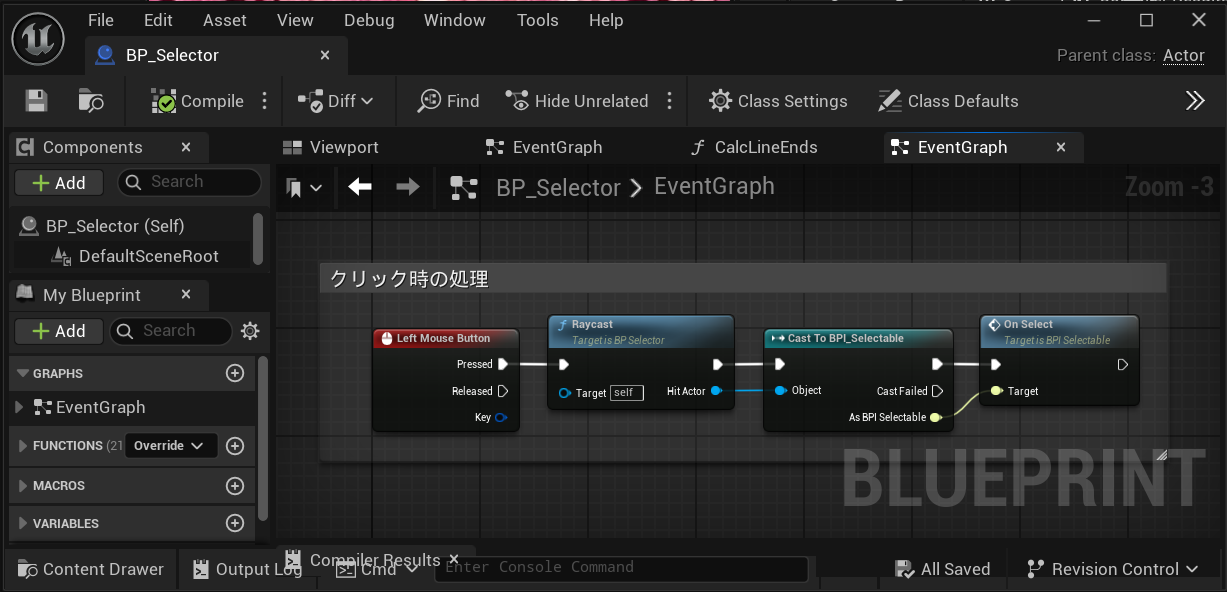 |
|---|
| Example of calling a function via an Interface |
I was moved by this, having grown accustomed to Visual Scripting and PlayMaker!
Dependency Inversion through Blueprint!
In Unreal Engine's Blueprint, there is a feature equivalent to Unity's C# Action Delegate. This is the Event Dispatcher!
Unfortunately, Unity's Visual Scripting does not have this mechanism…
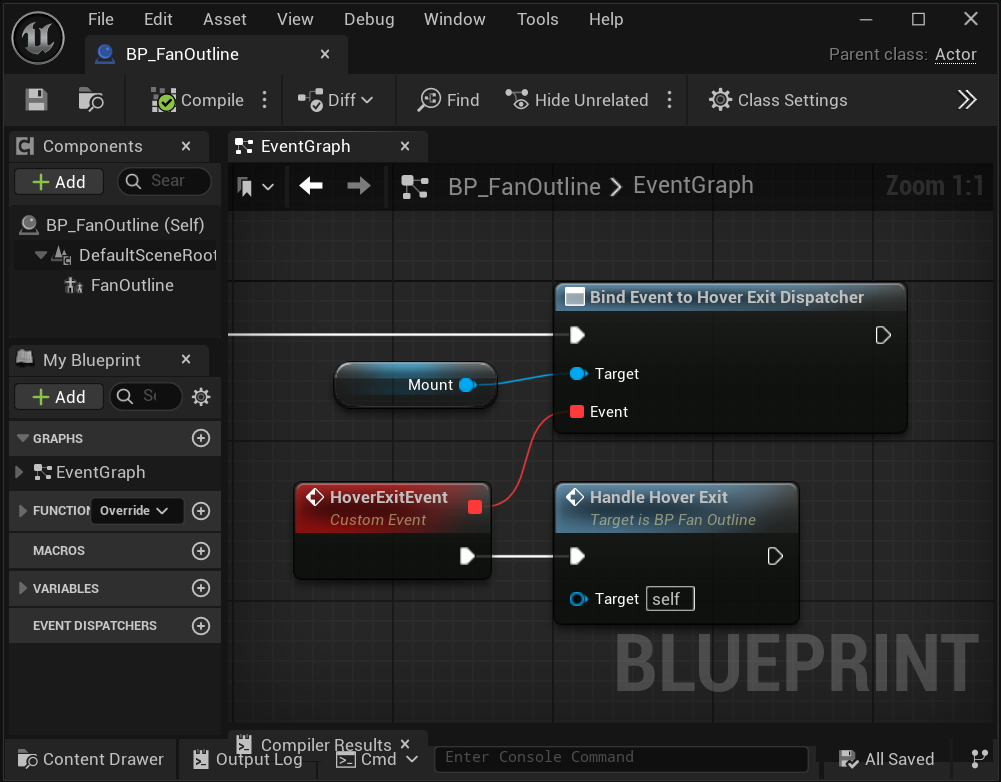 |
|---|
| Event Dispatcher diagram |
With Event Dispatcher, you can achieve Dependency Inversion! This makes it easier to create loosely coupled Blueprints.
Conclusion
While I initially faced negative challenges when starting with Unreal Engine, I eventually felt positive surprises and inspiration.
This feeling closely resembles the excitement when learning a new programming language. It has been a delight to experience this excitement again.
I'm glad I took on the challenge!
In creating this article, I referred to the following pages. Thank you for the clear guides!
Here is additional information.
Note
For readers unfamiliar with Unity, this article might create the impression that "UE is superior to Unity," so I want to provide some clarification.
Unity does have Visual Scripting (formerly Bolt), which corresponds to Blueprint's EventGraph. However, Visual Scripting lacks features like Interfaces and Event Dispatchers, making it less suited for large-scale programming.
However, this does not imply that Unity is inferior to UE.
Unity natively supports C#, an extremely powerful object-oriented language. Unity developers mainly use C#, allowing them to leverage Interfaces and Delegates (equivalent to Event Dispatchers), and C# offers a plethora of advanced features.
Cases for using Visual Scripting are generally limited to specific scenarios, like:
- Environments where C# is unusable
- Creators who don't primarily specialize in programming
For usual development purposes, C# is used.
Thus, this article doesn't compare the superiority of UE and Unity. It simply highlights the differences I felt when comparing Visual Scripting to Blueprints.