How to Easily Handle Formulas in PlayMaker: Recommended Use of MathExpression
This article is a translated version of my original post on Qiita. Original (Japanese): https://qiita.com/segur/items/663e075890da6632351c
Hello, I'm Segyu, an AR engineer!
I create XR content daily using PlayMaker.
In this article, I'll introduce useful tips to simplify complex mathematical formulas in PlayMaker. This content is also highly recommended for STYLY users!
Basic Arithmetic with Float Operator...
To perform basic addition, subtraction, multiplication, and division in PlayMaker, you use the Float Operator action.
https://hutonggames.fogbugz.com/default.asp?W81
Example: Calculating 10 * 5
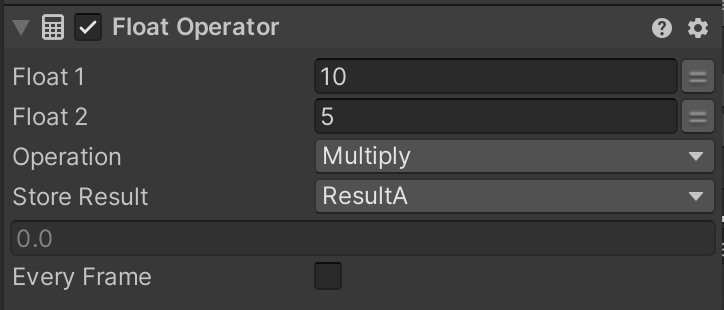
Settings for Float Operator Action:
- Value 1: 10
- Value 2: 5
- Operation: Multiply
- Result: ResultA
The result is stored as 50 in ResultA.
Increased Effort with Complex Formulas...
For handling a formula like 10 * 5 + 20 * 2, multiple Float Operator actions are necessary.
10 * 5 → ResultA20 * 2 → ResultBResultA + ResultB → ResultC
This requires three actions and intermediate variables, which can make it hard to manage and maintain...
Solution: Using the MathExpression Action!
This is where the very handy MathExpression action comes into play!
With this action, you can write formulas directly like this:
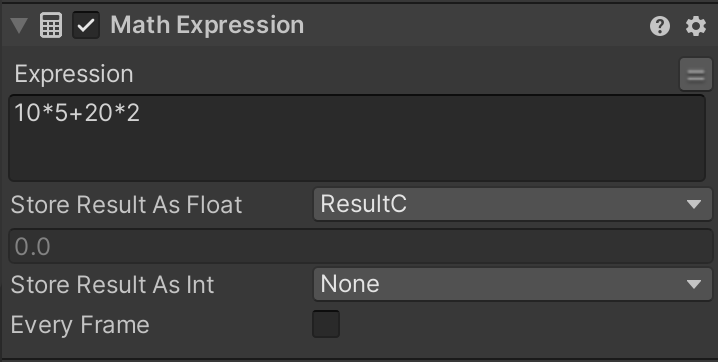
10*5+20*2
You can also combine variables like this:
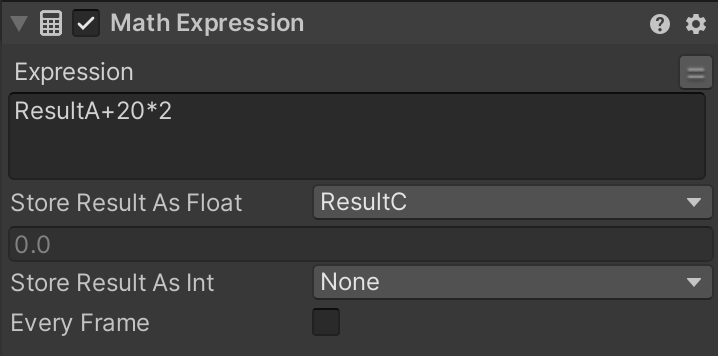
ResultA+20*2
This MathExpression action is mysteriously missing from the official PlayMaker Action Reference...
https://hutonggames.fogbugz.com/default.asp?W41
I did not know about this action for two years myself.
(I wish I had learned about it sooner...!)
Conclusion
By using the MathExpression action, you can achieve:
- Completion of complex formulas in a single action
- Elimination of intermediate variables
- Neat and organized states
If you want to use PlayMaker more efficiently, definitely give this action a try!