Command to Center an Image with Blurred Background Edges
This article is a translated version of my original post on Qiita. Original (Japanese): https://qiita.com/segur/items/6fc88aef0db4cec4c90e
Recently, I created an augmented reality (AR) piece like the one described below.
While strolling around Sakae in Nagoya, I discovered the "Peeing Boy" statue!
— segur(せぎゅ)@都市ARエンジニア (@segur_vita) November 19, 2023
However, it seems to lack a fountain feature...
So, I created an AR fountain!
If you can visit the site, experience AR from here!
👉 https://t.co/A24c9oMKBa
The location is near the lion's mouth entrance of Nagoya Mitsukoshi! #STYLY #AR #Nagoya #Sakae… pic.twitter.com/HQBhbxZTTC
When creating the thumbnail for this piece, I applied the following image transformation!
| Image | |
|---|---|
| Input | 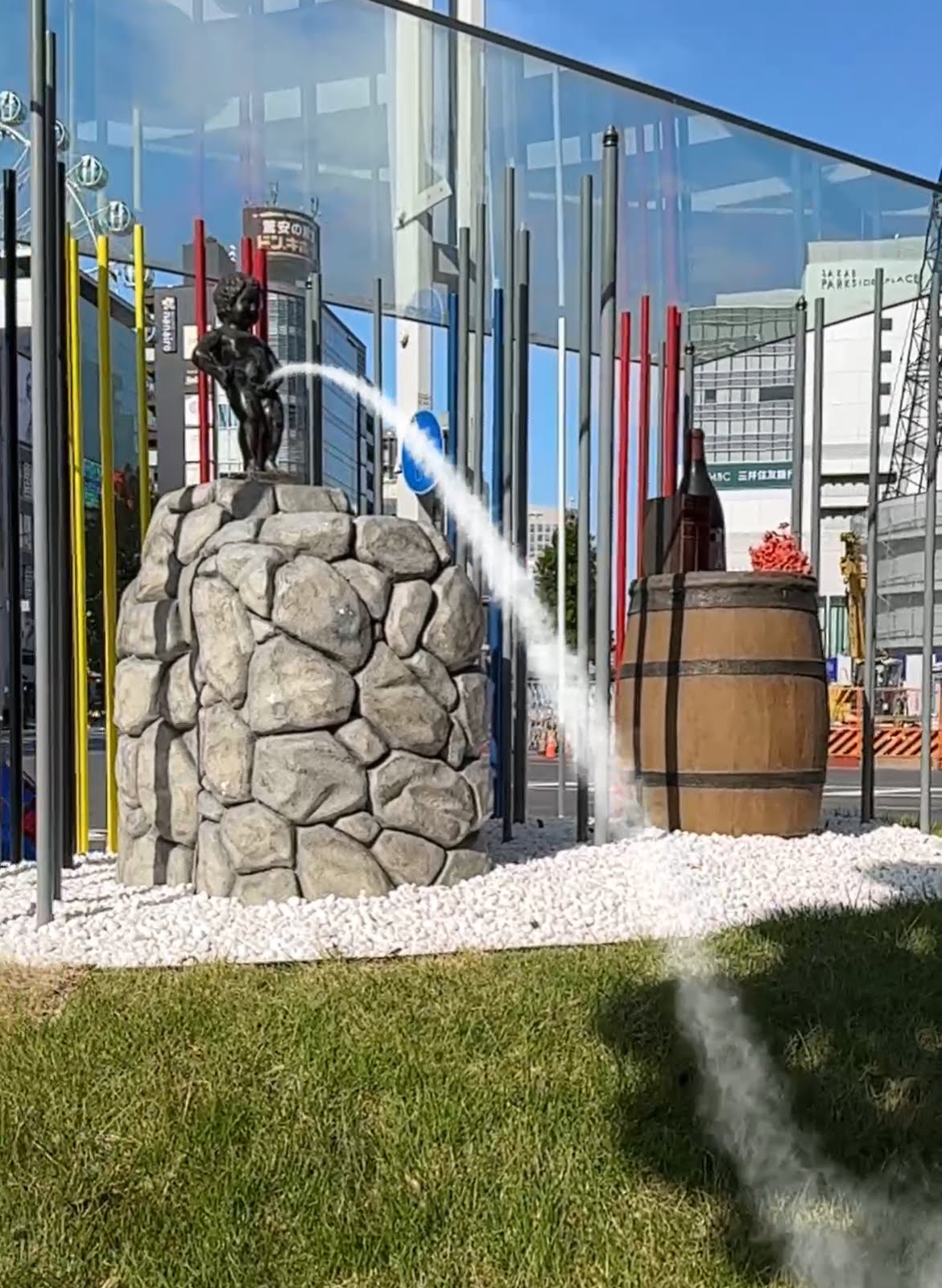 |
| Output | 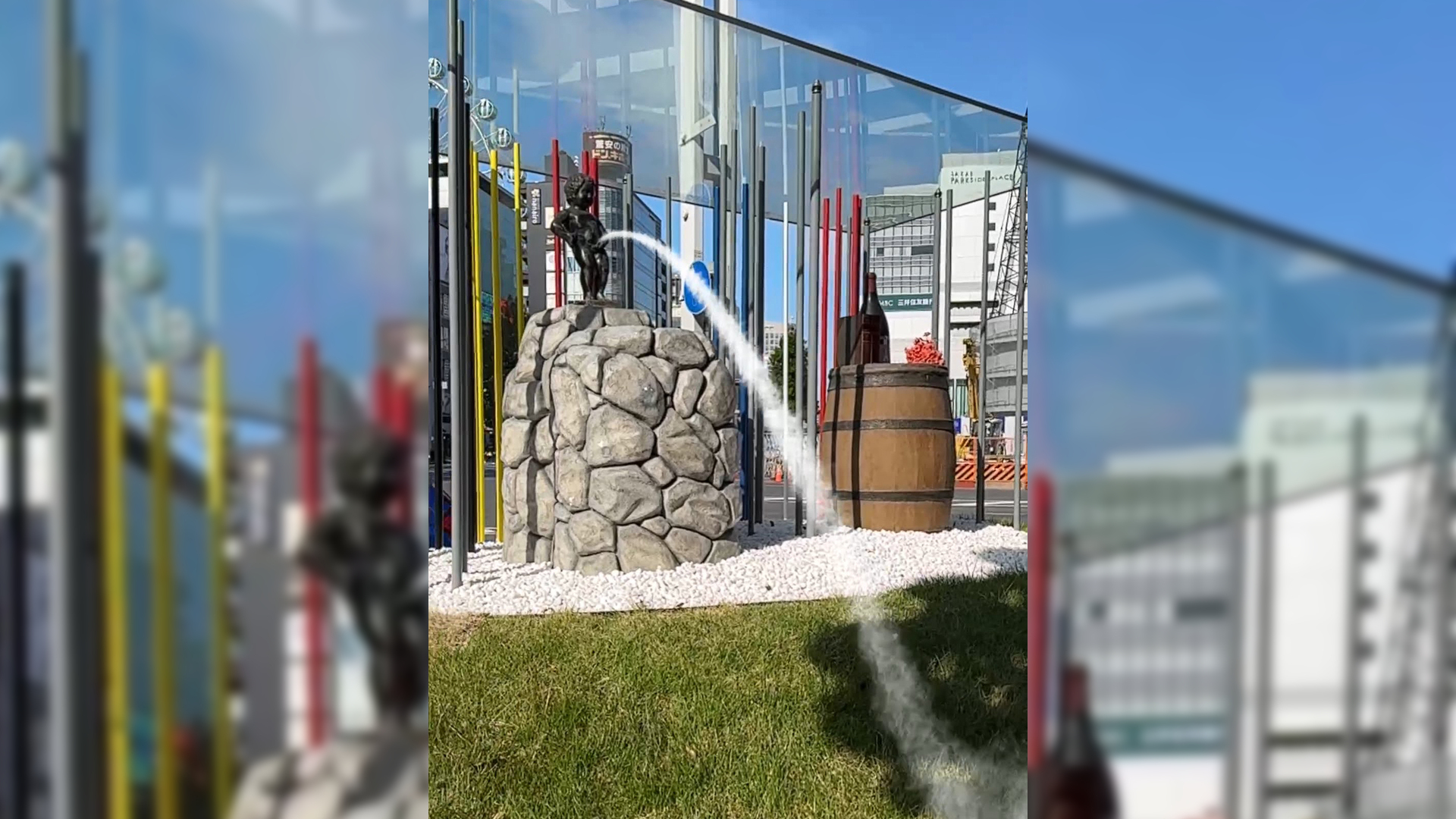 |
In essence, when resizing a vertically long image to 1920x1080, the idea was to fill the margins with an enlarged, blurred version of the input image!
Process Overview
Here's the step-by-step process for the above image transformation!
- Resize the input image's width to 1920, apply a blur effect, and save it as
background.jpg. - Resize the input image's height to 1080 and save it as
foreground.jpg. - Use
background.jpgas the background, and centerforeground.jpgon it to create the final output.
Commands
Here's the command I used! I utilized ImageMagick for the task.
magick convert input.jpg -resize 1920x -blur 0x8 -gravity north -extent 1920x1080 background.jpg
magick convert input.jpg -resize x1080 foreground.jpg
magick convert background.jpg foreground.jpg -gravity center -composite output.jpg
Note that the version of ImageMagick used was 7.1.
This image transformation worked perfectly on both Windows and macOS!
In Conclusion
For creating this article, I referred to the following page. Thank you for the insightful information.
- https://qiita.com/yoya/items/b6926f01b7cb90217e07
 |\n|Output|
  |\n\nIn essence, when resizing a vertically long image to 1920x1080, the idea was to fill the margins with an enlarged, blurred version of the input image!\n\n# Process Overview\n\nHere's the step-by-step process for the above image transformation!\n\n1. Resize the input image's width to 1920, apply a blur effect, and save it as `background.jpg`.\n2. Resize the input image's height to 1080 and save it as `foreground.jpg`.\n3. Use `background.jpg` as the background, and center `foreground.jpg` on it to create the final output.\n\n# Commands\n\nHere's the command I used! I utilized ImageMagick for the task.\n\n```bat\nmagick convert input.jpg -resize 1920x -blur 0x8 -gravity north -extent 1920x1080 background.jpg\nmagick convert input.jpg -resize x1080 foreground.jpg\nmagick convert background.jpg foreground.jpg -gravity center -composite output.jpg\n```\n\nNote that the version of ImageMagick used was 7.1.\n\nThis image transformation worked perfectly on both Windows and macOS!\n\n# In Conclusion\n\nFor creating this article, I referred to the following page. Thank you for the insightful information.\n\n- https://qiita.com/yoya/items/b6926f01b7cb90217e07";
function copyField(id, btn) {
const text = document.getElementById(id).textContent.trim();
navigator.clipboard.writeText(text).then(() => {
btn.textContent = '✓ Copied';
btn.classList.add('copied');
setTimeout(() => {
btn.textContent = 'Copy';
btn.classList.remove('copied');
}, 2000);
}).catch(() => {
// Fallback for older browsers
const el = document.getElementById(id);
const range = document.createRange();
range.selectNodeContents(el);
const sel = window.getSelection();
sel.removeAllRanges();
sel.addRange(range);
document.execCommand('copy');
sel.removeAllRanges();
btn.textContent = '✓ Copied';
btn.classList.add('copied');
setTimeout(() => {
btn.textContent = 'Copy';
btn.classList.remove('copied');
}, 2000);
});
}
async function copyArticle() {
const btn = document.getElementById('copyArticleBtn');
try {
await navigator.clipboard.writeText(rawMarkdown);
btn.textContent = '✓ Copied! Open dev.to and paste.';
btn.classList.add('copied');
setTimeout(() => {
btn.textContent = '📋 Copy Article to Clipboard';
btn.classList.remove('copied');
}, 3000);
} catch (err) {
// Fallback: temporary textarea
const ta = document.createElement('textarea');
ta.value = rawMarkdown;
ta.style.position = 'fixed';
ta.style.opacity = '0';
document.body.appendChild(ta);
ta.select();
document.execCommand('copy');
document.body.removeChild(ta);
btn.textContent = '✓ Copied (fallback)! Open dev.to and paste.';
btn.classList.add('copied');
setTimeout(() => {
btn.textContent = '📋 Copy Article to Clipboard';
btn.classList.remove('copied');
}, 3000);
}
}
|\n\nIn essence, when resizing a vertically long image to 1920x1080, the idea was to fill the margins with an enlarged, blurred version of the input image!\n\n# Process Overview\n\nHere's the step-by-step process for the above image transformation!\n\n1. Resize the input image's width to 1920, apply a blur effect, and save it as `background.jpg`.\n2. Resize the input image's height to 1080 and save it as `foreground.jpg`.\n3. Use `background.jpg` as the background, and center `foreground.jpg` on it to create the final output.\n\n# Commands\n\nHere's the command I used! I utilized ImageMagick for the task.\n\n```bat\nmagick convert input.jpg -resize 1920x -blur 0x8 -gravity north -extent 1920x1080 background.jpg\nmagick convert input.jpg -resize x1080 foreground.jpg\nmagick convert background.jpg foreground.jpg -gravity center -composite output.jpg\n```\n\nNote that the version of ImageMagick used was 7.1.\n\nThis image transformation worked perfectly on both Windows and macOS!\n\n# In Conclusion\n\nFor creating this article, I referred to the following page. Thank you for the insightful information.\n\n- https://qiita.com/yoya/items/b6926f01b7cb90217e07";
function copyField(id, btn) {
const text = document.getElementById(id).textContent.trim();
navigator.clipboard.writeText(text).then(() => {
btn.textContent = '✓ Copied';
btn.classList.add('copied');
setTimeout(() => {
btn.textContent = 'Copy';
btn.classList.remove('copied');
}, 2000);
}).catch(() => {
// Fallback for older browsers
const el = document.getElementById(id);
const range = document.createRange();
range.selectNodeContents(el);
const sel = window.getSelection();
sel.removeAllRanges();
sel.addRange(range);
document.execCommand('copy');
sel.removeAllRanges();
btn.textContent = '✓ Copied';
btn.classList.add('copied');
setTimeout(() => {
btn.textContent = 'Copy';
btn.classList.remove('copied');
}, 2000);
});
}
async function copyArticle() {
const btn = document.getElementById('copyArticleBtn');
try {
await navigator.clipboard.writeText(rawMarkdown);
btn.textContent = '✓ Copied! Open dev.to and paste.';
btn.classList.add('copied');
setTimeout(() => {
btn.textContent = '📋 Copy Article to Clipboard';
btn.classList.remove('copied');
}, 3000);
} catch (err) {
// Fallback: temporary textarea
const ta = document.createElement('textarea');
ta.value = rawMarkdown;
ta.style.position = 'fixed';
ta.style.opacity = '0';
document.body.appendChild(ta);
ta.select();
document.execCommand('copy');
document.body.removeChild(ta);
btn.textContent = '✓ Copied (fallback)! Open dev.to and paste.';
btn.classList.add('copied');
setTimeout(() => {
btn.textContent = '📋 Copy Article to Clipboard';
btn.classList.remove('copied');
}, 3000);
}
}