Why Sound Works in Unity but Not on Apple Vision Pro!?
This article is a translated version of my original post on Qiita. Original (Japanese): https://qiita.com/segur/items/85e707303b5095c9cfe3
Why Sound Works in Unity but Not on Apple Vision Pro!?
While developing an app for visionOS, I encountered an issue where sound would not play on the actual Vision Pro device! The perplexing part was that some apps produced sound while others did not (I was working on multiple apps). It took me about three days to resolve this, so I'm jotting down my notes before I forget.
Scene Configuration
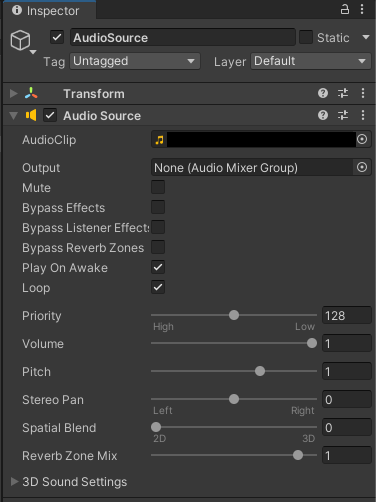
The scenes were configured as follows:
- An
AudioSourcewas placed within the scene. Play On Awakewas enabled, so the sound should play when the scene starts.
Symptoms
The symptoms were:
- Sound plays in Unity Editor, but not on Apple Vision Pro.
- However, sound plays when opening Control Center during the app's runtime.
I recorded the phenomenon. Watch below!
I encountered an issue where the BGM only plays for a short moment before stopping when launching my app on VisionPro. Interestingly, opening Control Center resumes the BGM. I'm sharing the recording for anyone facing the same issue. You can find the solution in the referenced post! https://t.co/v7frblQwF1 pic.twitter.com/YdrmgVvQhC
— segur(せぎゅ)@ARエンジニア (@segur_vita) April 3, 2024
This issue impacts some apps while others remain unaffected.
Investigation
Initially, I suspected Play On Awake might be the problem, so I tried explicitly executing Play from C#, but this did not resolve the issue.
I then attempted various fixes like rebuilding the Unity project and performing a clean build in Xcode, all to no avail.
What differentiates apps with these symptoms from those without? I scrutinized the settings screen but could not pinpoint a decisive difference...
Amidst this, I found the following page while researching similar issues:
- https://discussions.unity.com/t/no-audio-is-heard-by-the-player-during-gameplay/328641
This page described my exact issue!
Cause
The problem was due to specifying separate files for:
- Project Settings' Volume Window Config
- Scene's Volume Window Config
What Was Happening
- When the app launches, it reads the Volume Window Config from the Project Settings.
- At this point,
AudioSourceattempts to play sound. - Shortly after, the Volume Camera within the scene loads and brings in a different Volume Window Config.
- If the Bounded or Unbounded settings change during this, it inexplicably silences the
AudioSource.
Resolution
To resolve the sound issue, set the same file for the following two configurations:
- Project Settings' Volume Window Config
- Scene's Volume Window Config
Here are the configuration details:
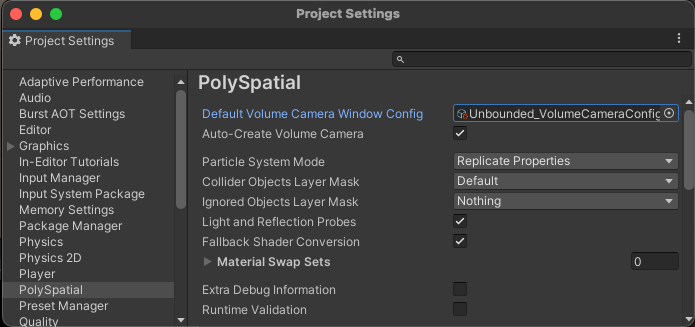
Project Settings' Volume Window Config
You can set the file in Project Settings > PolySpatial > Default Volume Camera Window Config.
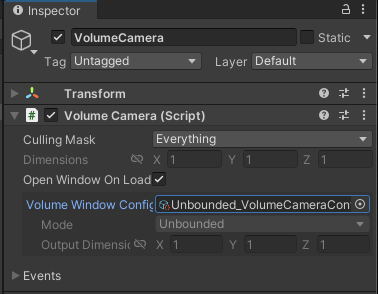
Scene's Volume Window Config
In the scene, you can set the file in the Volume Window Config of the installed VolumeCamera.
In Closing
I referenced the following page when creating this article. Thank you for the helpful information:
- https://discussions.unity.com/t/no-audio-is-heard-by-the-player-during-gameplay/328641
I also want to express my gratitude to everyone who offered advice during this investigation; it was greatly encouraging! Thank you very much!